WhatsApp Button Not Working On Your Website: Fixes By Symptom
Nothing happens, a blank tab, an invalid number, or fine on a phone and dead on a laptop. What each one means, and the setup we would replace the broken button with.
One of these four lines is probably yours. Find it, read its section, and skip the rest.
- Nothing happens. You click or tap and the page just sits there.
- A blank page. A new tab opens and stays empty, or shows a WhatsApp error where the chat should be.
- “Invalid number.” WhatsApp opens, then says the phone number shared via URL is invalid.
- Fine on a phone, dead on a laptop. Or fine for you, and dead for the customer who told you about it.
We build this kind of button for a living, and our view is blunt: a WhatsApp button not working on your website is rarely a broken button. Most often it is a link somebody typed by hand or copied from an old tutorial, with something small wrong in it. Usually a stray zero or a dash. Sometimes an address only a phone understands.
Each section says what is wrong, then gives the fix we would actually use: stop patching the link and set the button up in Flidu, where you enter the number once and the link is built for you.
WhatsApp Button Not Working On Your Website: Match Your Symptom
| What You See | What Is Going On | What Fixes It |
|---|---|---|
| Nothing on a computer, or an empty new tab | An app-only link a browser cannot follow | Rebuild the button in Flidu |
| Nothing happens anywhere | Something invisible covers the button | Clear the overlap, or switch corners |
| WhatsApp’s “This page doesn’t exist” | Punctuation in the number, or a badly joined message | Enter the number once in Flidu |
| “Phone number shared via URL is invalid” | A local-format number, or no WhatsApp account | Correct the number yourself |
| Fine on a phone, stuck on a computer | WhatsApp Web asks for a linked device | Add a second channel |
| Stalls only from Instagram or Facebook | The social app’s built-in browser | Add a second channel |
| Chat opens, message cut short | An “&” or “#” in a hand-built message | Use the Prefilled message field |
First, Look At What The Button Actually Sends
Most buttons, whatever made them, simply hand the visitor’s browser a link. Get that link out where you can read it. Not to repair it by hand, only to learn which fault you have.
A Quick Test For A WhatsApp Button Not Working On Your Website
- On a computer, right-click the button and choose Copy Link Address (the wording varies by browser), then paste it into a text note. No such option means the button is run by a script, or your click is not reaching it. Go to Symptom 1.
- Read how it starts. A link that does not begin with https is Symptom 1 too.
- Look at the number. Dashes, spaces or brackets point to Symptom 2. A leading 0, or no country code, points to Symptom 3.
- Open your page in a private window, then on a phone that is not yours. Your own devices are signed in to WhatsApp and pass tests a visitor fails.
Symptom 1: You Click And Nothing Happens
No reaction at all is the most confusing result, because there is no error message to search for. It has two common causes.
The Link Uses An App-Only Address
Some older snippets and app-builder tutorials produce a link that starts with the app’s name where a web address would say https. That is not a web address: it tells the device to pass the request to an installed app. On a phone with WhatsApp, something answers. On a laptop without the desktop app, nothing does.
A link like that is not worth editing. Replace the button: the Flidu WhatsApp channel always opens WhatsApp’s own web link, which every browser can follow.
Something Is Sitting On Top Of The Button
If right-clicking offers no link option, your click may be hitting something else: often a cookie banner that was dismissed but never removed, or a second chat tool in the same corner. Press Tab until the button is highlighted, then Enter. If that works and the mouse does not, the button is covered, the reverse of a chat widget covering content on mobile. If the keyboard fails too, the button’s own script is at fault. Replace that button; don’t debug it.
Remove the overlap if you can. Otherwise move the button. On a Flidu widget’s Appearance tab, Position is Bottom-right or Bottom-left, and those are the only two places the launcher can sit.
Symptom 2: It Opens A Blank Page Or An Error Page
An empty new tab is usually Symptom 1 again: the same app-only address, opened in a new tab.
A WhatsApp error page means the link reached WhatsApp and could not be read. In October 2026 we ran some deliberately broken links, built on a made-up number, through WhatsApp’s short-link service. Two mistakes landed on a 404 page saying This page doesn’t exist: punctuation in the number (dashes, brackets and spaces all failed) and a message joined to the number with the wrong character.
Both are typing mistakes, and both come back the next time somebody edits the link in a hurry. Flidu strips the spaces and punctuation from the number you enter and attaches the message itself, so there is no link left for anyone to mistype.
Symptom 3: WhatsApp Says The Number Is Invalid
Good news in disguise: the button worked and the link reached WhatsApp. As far as we can tell, WhatsApp then failed to match the number to an account. No tool repairs this one for you, ours included.
The Number Was Typed The Local Way
WhatsApp’s own help center asks for a full phone number in international format, with no zeroes, brackets or dashes added. In practice that means the country code first, then the national number, which in most countries loses its leading zero on the way.
- A UK mobile written 07700 900123 goes in as +44 7700 900123.
- The US number (202) 555-0123 goes in as +1 202 555 0123.
- Anything printed as +44 (0)7700 900123 is a trap. Strip the symbols and the bracketed zero stays behind, in the middle of the number.
The Phone number field in Flidu strips spaces, brackets and dashes for you. It will not add a missing country code or drop a leading zero, because it cannot know which country you meant.
The Number Is No Longer On WhatsApp
Click to chat needs an active WhatsApp account on the number. Perhaps the landline from the letterhead went into the button, or the phone was replaced and nobody set WhatsApp up again. Accounts lapse too: WhatsApp says they are generally deleted after 120 days of inactivity (opens in a new tab), which is how a button that worked in spring can be dead by autumn with nobody touching the website.
If the cure is a dedicated business number, read Is It Safe To Put Your WhatsApp Number On Your Website? first.
Symptom 4: It Works On Mobile And Fails On Desktop
Rule out the app-only address from Symptom 1 first, because it produces exactly this pattern. With a proper web link, the “failure” is usually WhatsApp working as designed.
What A Desktop Visitor Actually Sees
On a phone, the link normally hands over to the app. On a computer it loads a WhatsApp page first. When we checked in October 2026 it read Chat on WhatsApp with and the number, above an Open app button and a Continue to WhatsApp Web link. Without the desktop app, the visitor goes on to WhatsApp Web and, unless that browser is already linked, has to link it first, normally by scanning a QR code with their phone. Some stop there. They had one question, and the phone was in a bag.
You cannot fix that from your website, and neither can Flidu. What a Flidu widget does let you do is put a second channel beside WhatsApp, so it is not the only way in. Messenger and Telegram are on Website Widgets Free, though each needs a login of its own. A Contact Form needs none: it starts on Website Widgets Starter and emails each submission to you. (Contact Form Versus WhatsApp Button makes the case for running both.)
When It Only Fails From Instagram Or Facebook
A stranger case: the button works in Safari and Chrome and stalls for visitors who tapped through from a social app. Those apps open your site in their own built-in browser, which does not always pass a link out to another app. We found no official documentation on which apps do what, so we won’t pretend to have a rule. Test it from inside the app (your bio link will do). If the button stalls, that second channel is the way out.
Bonus Symptom: The Chat Opens But The Message Is Cut Off
Nobody reports this one, because the chat still opens. The opening message just arrives cut short. In the same October test, Quote for kitchen & bathroom came out as “Quote for kitchen”, and Order #1042 status as “Order”. An ampersand ends the message early; a hash discards everything after it.
A hand-built message breaks this way again every time somebody rewords it. Type the sentence into Flidu’s Prefilled message field as ordinary text, ampersands and all, and it is encoded for you.
How To Rebuild The WhatsApp Button In Flidu
The WhatsApp chat button is a channel inside a Flidu Website Widget, and one WhatsApp number is included on every Website Widgets plan, Free among them (the pricing page has the limits). You need a number that already works in WhatsApp, and access to wherever your site accepts custom code.
Set Up The WhatsApp Channel
- In the dashboard (a free account is enough), open Website Widgets in the sidebar and start a new widget. Its five steps are Website Details, Starting Setup, Channels, Appearance and Preview & Create; tick WhatsApp at Channels. If you made a site during sign-up, open that one from Website Widgets instead. The setup guide has the wider walkthrough.
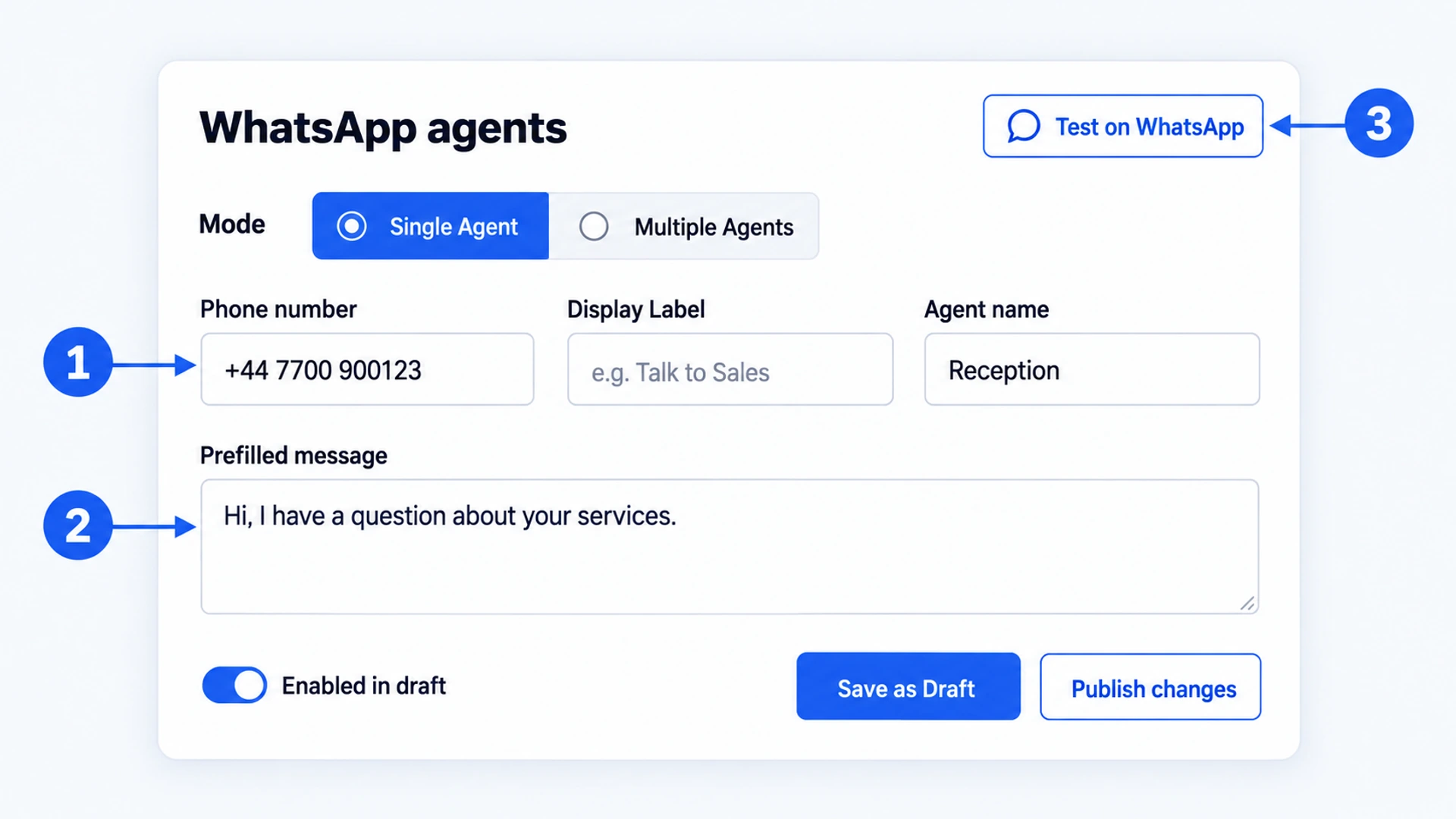
- Channels ticked there arrive as unpublished drafts, so open the widget’s Channels tab. In Channel Builder, press Add Channel and pick WhatsApp under Direct Contact (if the channel already exists, this opens its editor).
- Leave Mode on Single Agent. Type the Phone number in full, country code first, and fill in Agent name, which is required.
- Write the Prefilled message: one plain sentence, such as “Hi, I have a question about your services.” The field is optional; leave it blank and the chat opens empty.
- Press Test on WhatsApp, which appears beside the WhatsApp agents heading once a number is in. It opens the same chat a visitor will get. If WhatsApp objects to the number here, fix it now.
- Check that Enabled in draft is on, press Save as Draft, then Publish changes. Nothing reaches your site until you publish.
Install It Once And Check The Status
- Open the widget’s Install tab and press Copy. Each widget has its own snippet.
- Paste it just before the closing body tag of your site, or into your platform’s custom code area, once and site-wide. The install reference covers placement, and there is a separate walkthrough for Squarespace.
- Take the old button off the page the same day. Two launchers in one corner is one way Symptom 1 starts.
- Load your live site, return to the Install tab and press Verify Installation. Until the script has loaded on your site, the status reads “Not detected yet”.
- Tap the button on a phone that is not yours. If no launcher shows at all, start with the checklist linked near the top.
<script defer src="https://flidu.com/widget.js" data-widget="YOUR_WIDGET_KEY"></script>From then on the number and the message are edited and republished in the dashboard, and the script on your site never changes.
What This Setup Will Not Fix
Moving the button into Flidu gets rid of the typing mistakes. The causes that sit outside your website stay where they were, the desktop login step among them.
- A wrong or dead number stays that way. Leave out the country code, keep the local leading zero, or use a number with no WhatsApp account, and the chat fails exactly as before.
- Several numbers need a paid plan. Multiple Agents mode, where the visitor picks between contacts such as Sales and Support, starts on Website Widgets Starter. Free is one number.
- Tap counts are not on Free. Website Widgets Free shows usage counters only. Channel clicks show in the dashboard from Website Widgets Starter, and How To Track WhatsApp Button Clicks In GA4 covers sending them to Google Analytics.
- Somebody still has to reply. The widget hands the visitor to WhatsApp and stops. The conversation happens there, and Flidu stores none of it.
If most of your messages arrive when nobody is near the phone, the button is working and the problem has moved. How To Capture Leads After Business Hours picks it up from there.