
Contact Form Versus WhatsApp Button: Run Both For A Month
Form sellers and chat sellers each say theirs wins. Put both in one widget for a month and count what reaches you instead.

Ask a company that sells form software and a contact form is the sensible choice: it screens out time-wasters and hands you every detail you need to quote. Ask a company that sells chat buttons and the form is where enquiries go to die, while a WhatsApp button brings in several times as many.
Neither claim is a law of nature. Each describes something true about one kind of business and then stretches it over every website. The contact form versus WhatsApp button question does have an answer for your site, and a month is long enough to find it.
The chat pitch usually comes with a figure attached. Those we found sat on pages selling WhatsApp tools, with no data we could open, so we quote none.
Here is what we’d do instead. Put both routes in one widget for a month and count the enquiries that arrive, not the clicks. The widget we use is Flidu, which we build, so weigh our advice accordingly. If the count comes out close, one thing settles it: who answers, and how fast.
Contact Form Versus WhatsApp Button: What Each One Loses
Every contact route buys one thing by giving up another. A form gets you the detail and makes everyone wait. A button gets you a message this minute, with very little in it.
| What You Get | Contact Form | WhatsApp Button |
|---|---|---|
| First message | Name, email and a written request | Often one line, sometimes just “Hi” |
| Where it lands | A mailbox several people can open | One WhatsApp account |
| What the sender expects | A reply within a day or so | A reply within minutes |
The last row is our reading of how people behave. Nobody measured it.
The Form Loses Speed
From the visitor’s chair, a form ends in a thank-you message and then nothing. They can’t tell whether a person has read it, so they carry on comparing you with everyone else.
What the form keeps is the detail: a name, a way to reply and a description of the job. One sent at two in the morning can also wait until breakfast.
The Button Loses Context
A WhatsApp button is a hand-off. On a phone with WhatsApp installed, one tap opens a chat with you.
But the message that arrives is thinner, often a single line: Hi, is this still available? You get a display name and, usually, a phone number, and the first few exchanges go on collecting what a form would have delivered in one go. Two more costs fall on your side.
- One account receives everything. WhatsApp says you can link up to four devices (opens in a new tab) to the main phone, so a colleague can read along, but nothing says whose turn it is to answer.
- Desktop visitors get an extra step. In a desktop browser, WhatsApp shows its own page with an Open app button before any chat begins. WhatsApp button not working on your website covers what goes wrong from there.
Why A Split Test Will Not Work On A Small Site
The textbook way to settle a contact form versus WhatsApp button argument is a split test: half your visitors see the form, half see the button. It needs volume. With a dozen enquiries a month, each version gets about six, and seven against five tells you nothing.
So don’t split. Show both routes to every visitor for a month and count what comes through each. That answers a narrower question, and we’d rather say so: which route visitors pick when both are offered, and what each delivers.
It’s only fair if both are offered the same way. A form filling half the contact page against a small green icon in a corner is a test of size.
Set Up Both Routes In One Flidu Widget
Flidu puts a launcher in the bottom corner of every page it’s installed on. Tapping it opens a panel that lists your channels as matching rows, each with an icon, a title and a line of description. A Contact Form is one row and WhatsApp is another, so neither gets the bigger button, and your contact page stays as it is.
- Open Website Widgets in the dashboard sidebar and start a new widget; the New Website Widget flow has five steps. If sign-up already gave you a site, open that one, look over its Channels tab and add both channels there with Add Channel.
- Website Details asks for a name, the Website Domain in bare form (example.com, no https) and a Notification email. For Starting Setup, pick Start with the essentials, which adds a Contact Form draft. Tick WhatsApp on the Channels step and finish with Create Website Widget.
- On the widget’s Channels tab, choose Edit on the Contact Form row. Check that Notification email points at a mailbox somebody reads every working day, and leave Phone Field off unless a call is your next step.
- Edit WhatsApp the same way. In Single Agent mode it needs a Phone number with its country code and an Agent name. Use Test on WhatsApp to confirm the chat reaches the right phone.
- In each channel, check that Enabled in draft is on, choose Save as Draft, then Publish changes. A channel reaches your site only once it’s published.
- From the Install tab, copy the snippet and paste it once before the closing body tag of your site, or into your platform’s custom-code area. Load your live site, run Verify Installation, then send yourself one form and one WhatsApp message from a phone on that site.
Later changes happen in the dashboard with no reinstall. The setup guide covers the wider setup.
Narrow Each Loss Before You Publish
For the form, the cure for slowness is a promise. Every channel has a Channel Title and a Description (the helper line under it), and the form has a Success Message shown in its place once sent. Use them to say who reads the message and by when. The widget adds a fixed line under yours, “We’ll get back to you as soon as possible.”, so anything more exact must come from you.
WhatsApp’s thin first messages have a fix too, the Prefilled message field. Whatever you type there is waiting, unsent, in the visitor’s message box when the chat opens, so end on a colon and let them finish the sentence.
Then check the line under the WhatsApp title. In Single Agent mode your Description fills it. Leave that empty and the row shows Displayed Availability, which starts on Always Available and tells visitors you’re available 24 hours. If you aren’t, write the Description or switch to Custom Hours. Both are display only: midnight messages still arrive.
Say you run a two-van moving company. The fields might read like this:
Contact Form / Channel Title: Request a quote
Contact Form / Description: Tell us about the move. Dana replies within one working day.
Contact Form / Success Message: Thanks. Dana will email your quote within one working day.
WhatsApp / Description: Quick question? Answered 9 to 5, Monday to Friday.
WhatsApp / Prefilled message: Hi, I am on your website and want to ask about: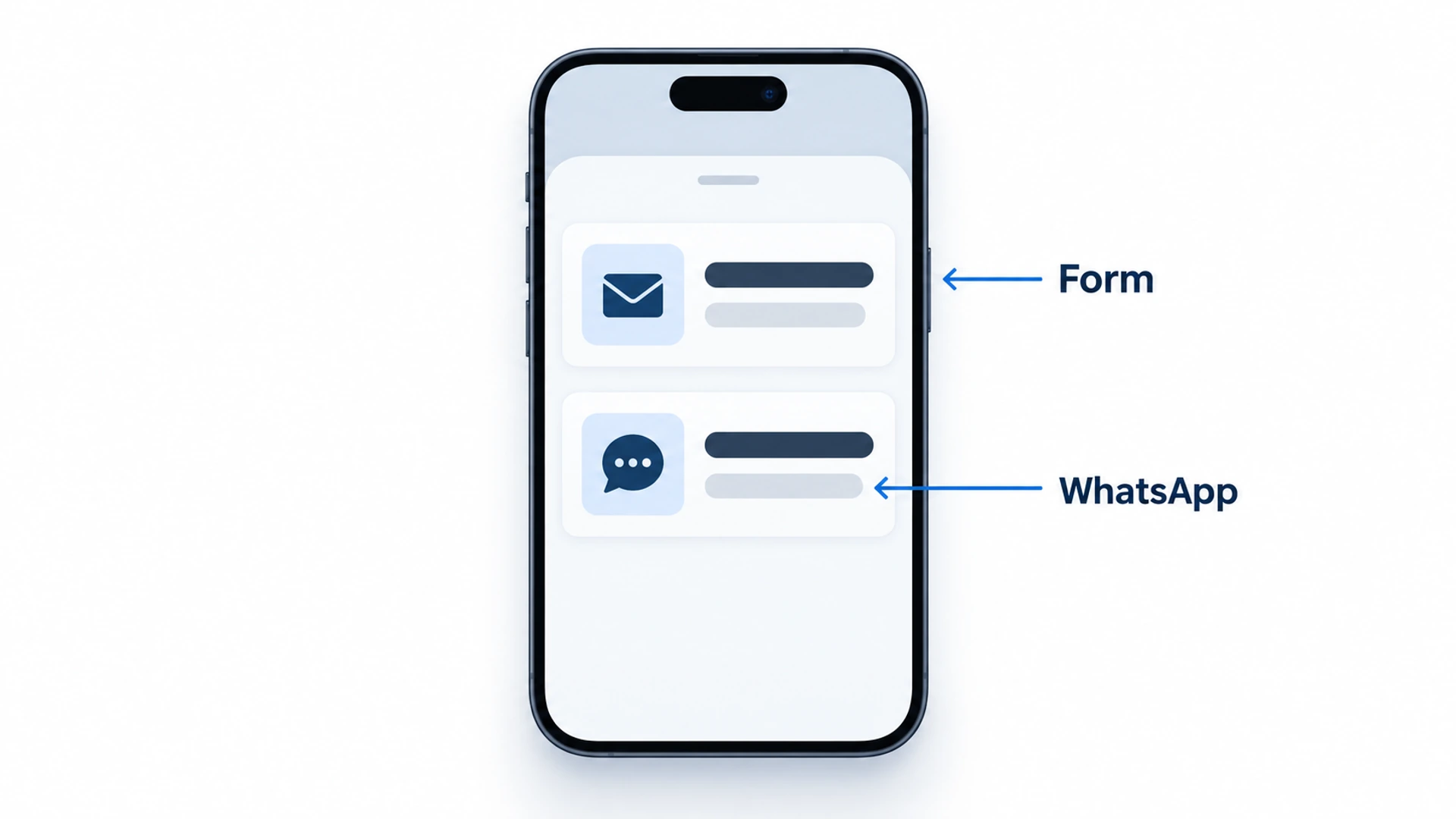
Run The Test For One Month
Once both rows are live, most of the work is leaving things alone.
- Name who answers each route. If nobody will watch WhatsApp this month, don’t run the test: an unanswered chat loses the enquiry and flatters the form.
- Run four full weeks. Call that the month: every weekday counts equally, and the whole run fits in the short history Starter keeps.
- Swap the order halfway. Position probably helps whichever row comes first, so at the two-week mark copy the dashboard counts into your sheet, then drag the other row above it in the Channel Builder and choose Publish order.
- Change nothing else. A new ad, a price change or a redesign can move the numbers more than either row.
- Log your old page form separately, if the contact page has one (and check that it delivers at all). The comparison is between the two rows.
A Fair Contact Form Versus WhatsApp Button Tally
Flidu counts what happens inside the widget, not what reaches you. The record of what arrived is yours to keep: one row per enquiry, written the day it comes in. The two sample rows are invented.
Date | Route | First message | Exchanges before a quote | Outcome
3 Nov | WhatsApp | Hi, do you do Saturdays? | 3 | Quoted
4 Nov | Form | 2-bed house, Leeds to York, 28 Nov | 0 | Won
A form enquiry is a notification email from the widget, carrying the visitor’s name, email and message. A WhatsApp enquiry is a new chat, usually still opening with your prefilled line. Exchanges before a quote is the column people skip. It measures the button’s missing context: the messages you had to send before you could name a price.
Read The Result In Website Widgets Analytics
On the last day, open Analytics in the dashboard sidebar and choose the Website Widgets tab. Pick the longest date range offered and copy the numbers into your sheet that day.
The card you want is Clicks by channel. Its two counts don’t mean quite the same thing. A WhatsApp click is a visitor tapping the row, which starts the hand-off. A Contact Form click is a visitor opening the form, not sending it. The Contact actions tile above it does count sent forms, but adds every WhatsApp tap to the same total, so on Starter you can’t separate the two.
So each route has two numbers: how many people reached for it, and how many enquiries came out the other end. What the gap means is guesswork on our part. Many form clicks and few emails suggest people open the form and give up, so check that Phone Field is off. If WhatsApp taps far outnumber chats, visitors are probably backing out at the hand-off, and the Prefilled message is the first thing we’d reword.
Be modest about small totals. Suppose the moving company ends the month with seven WhatsApp chats and five forms. That isn’t a win for WhatsApp; two people choosing differently would have reversed it. Our rule of thumb: unless one route brought in about twice as many as the other, call it a tie and compare the Outcome column.
Then read down the First message column. If WhatsApp brings quick questions and the form brings quote requests, the two rows are doing different jobs, and each Description should say which is for which.
The Deciding Rule: Who Answers And How Fast
When the count is a tie, the people behind the rows decide it.
- A named person replies to WhatsApp within the hour, in the hours shown on the row: put WhatsApp first. You can keep the promise a chat makes.
- Messages get answered once a day, in a batch: put the form first. A form tells the visitor to expect a wait, and in our view a chat left for six hours reads as being ignored.
If both get the same care, let the kind of enquiry decide: the form when you can’t say anything useful without detail, WhatsApp when most questions are short. Evenings are their own problem, covered in how to capture leads after business hours.
When One Route Gets Nothing
A zero only counts if that route was working, so send yourself a test before you believe it. If the form really got nothing, move it down but leave it live. WhatsApp can ban an account (is it safe to put your WhatsApp number on your website? shows what that looks like), and the form is your spare.
How Many Contact Options Is Too Many
If two rows are fine, why not seven? The same widget can hold Messenger, Instagram DM, Telegram, a map and a booking link.
Our rule of thumb is one primary action plus two or three others. No study fixes that number. Each row promises someone is watching it, and a channel you check once a week is worse than no channel. Put the primary route on top, and if nobody checked a channel last week, open it from the Channel Builder and choose Disable live.
What Flidu Will Not Tell You
- It never sees a WhatsApp conversation. The row is a click-to-chat hand-off. The tap is recorded and nothing after it.
- Below Website Widgets Business, form enquiries reach you by email only. From Business, the Data Hub also keeps them as records you can export to CSV.
- Starter doesn’t count sent forms on their own. On Website Widgets Pro, the Conversion Actions tab in Analytics adds a table of Clicks and Completed actions for each channel type (for WhatsApp, both columns count taps).
- There is no A/B testing. Every visitor sees both rows, which is the method here anyway.
If forms keep arriving half-empty, a Guided Form (Website Widgets Pro) asks its questions one at a time. Its answers are emailed to you, not passed into a WhatsApp chat.
What To Change When The Month Is Up
Change one thing: which row goes first. Drag the winner to the top in the Channel Builder, choose Publish order, and rewrite both Descriptions to match the reply times you managed.
Then keep the tally going for a second month. If month two contradicts month one, your numbers are too small to rank the two. Go back to the deciding rule, put the route your team answers fastest on top, and stop counting.
Frequently Asked Questions
Is a contact form or WhatsApp better for a small business website?
Should I remove my contact form and just use WhatsApp?
Can I have both a contact form and a WhatsApp button on the same page?
Do customers prefer WhatsApp or contact forms?
How many enquiries do I need before the comparison means anything?
 Conversion & Visitor ExperienceNobody Fills Out Your Contact Form. Is It Even Working?
 Website WidgetsWhatsApp Button Not Working On Your Website: Fixes By Symptom
 Conversion & Visitor ExperienceTrack Website Enquiries Without A CRM You Will Never Open
 Website WidgetsIs It Safe To Put Your WhatsApp Number On Your Website?