
Nobody Fills Out Your Contact Form. Is It Even Working?
A silent form is either broken or unwanted, and from your inbox the two look the same. Find out which you have, then put a short form that works on every page.

Before you read any further, pick up your phone. This takes two minutes. Switch off Wi-Fi so you’re on mobile data, open your website the way a stranger would, and send yourself an enquiry through the contact form. Type a real sentence, and give an email address that isn’t the one the form delivers to. Note the time.
Two things matter now. What did the screen say after you tapped the button? And has the message reached the inbox where somebody would read it?
We start there because when nobody fills out your contact form, there are two very different explanations. Either people aren’t trying, or they are trying and the message dies somewhere between the button and your inbox. So our position is blunt: prove the form delivers before you change anything about how it looks.
Quiet forms come in four kinds: broken, hidden, too demanding, or the wrong channel for your customers. Below is how to tell which you have, and then the fix we’d make: a short Contact Form in the Flidu widget, with WhatsApp beside it. We build Flidu, so weigh that as you read.
First, Prove The Form Delivers
A contact form does two separate jobs. It accepts what the visitor typed, and then it tells you about it, usually by email. The first job can succeed while the second fails, and nothing on the page will say so.
Your test will have ended in one of five ways.
| What You See | Likely Cause | What It Tells You |
|---|---|---|
| Thanks, then an email in minutes | The form delivers | The quiet is on the visitor’s side |
| Thanks, then an email in spam | The sender isn’t trusted | Real enquiries land there too |
| Thanks, then no email at all | Wrong recipient or failed send | Messages have been getting lost |
| An error or an endless spinner | The form is broken | Nobody can write, however keen |
| Email arrives, Reply is addressed to your own site | No Reply-To set | Your replies reached no one |
The Thank-You Message Proves Less Than You Think
It appears once the website has accepted the submission and handed an email to whatever sends its mail. Whether that email is then delivered, filtered or bounced gets decided later, on other people’s servers, and the page never hears about it. WordPress’s developer documentation says as much about its own mail function: success means the request was processed without errors, not that anyone received the email.
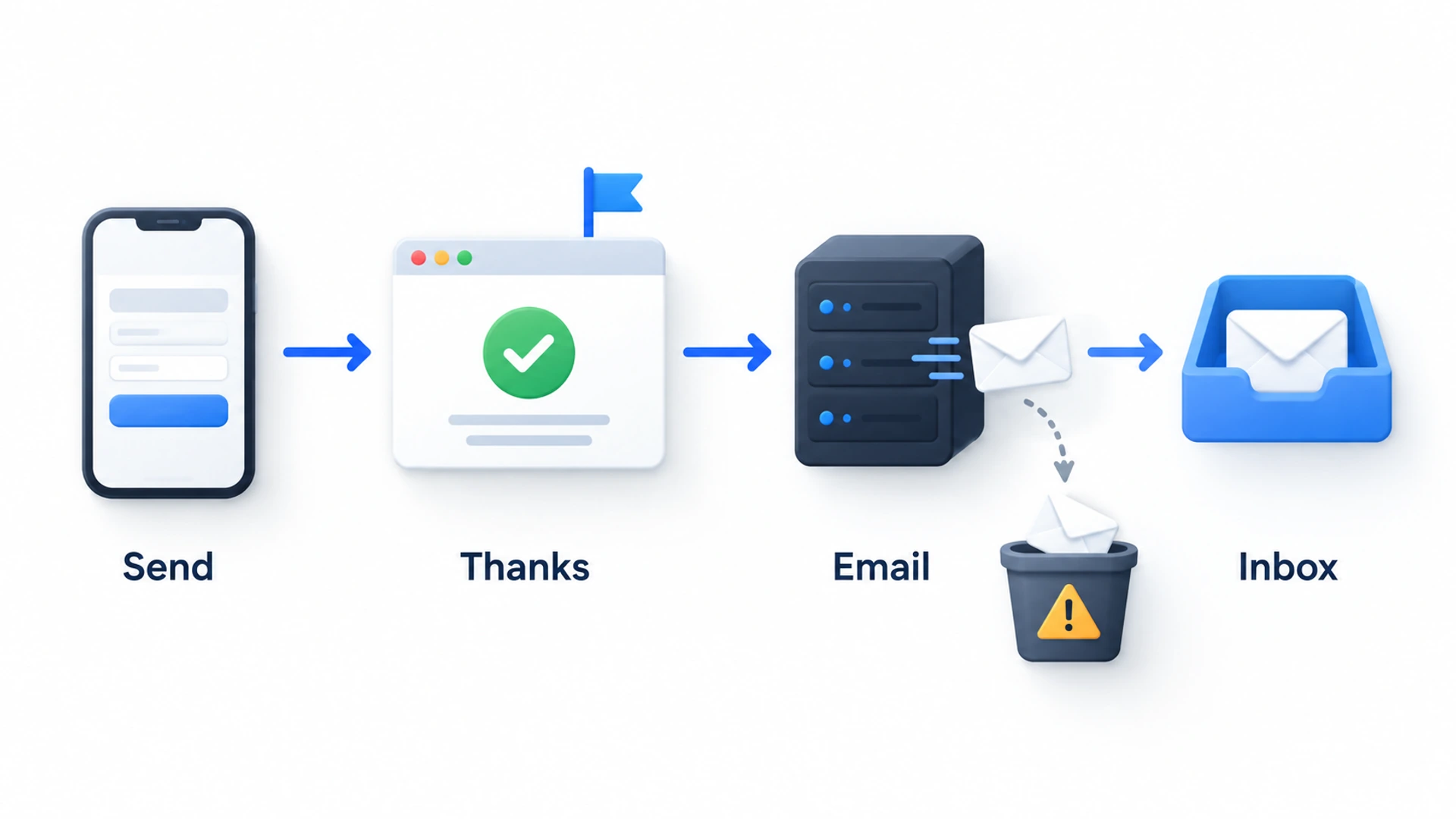
Where The Notification Goes Missing
Search every folder before deciding the email never came. In Gmail, type in:anywhere and a word from your test message. Gmail’s list of search operators (opens in a new tab) says that one covers Spam and Trash as well.
If it’s nowhere, it probably went to somebody else. On a form that has been quiet for months, the recipient is often the designer who built the site, or someone who has since left. That address is stored with the form itself, so updating the email on your website account doesn’t necessarily change it.
When the recipient is right and the email still lands in spam, suspect the sender. Many site forms send the notification from the web server but label it as coming from the visitor: it claims to be from jane@gmail.com, yet it left a hosting company’s server that Gmail has no reason to trust. Google’s email sender guidelines (opens in a new tab) ask every sender to authenticate with SPF or DKIM, warn that unauthenticated mail may be marked as spam or rejected, and say outright not to impersonate Gmail addresses in the From line.
Putting that right is hosting work, and we wouldn’t start on it yet.
Three More Reasons Nobody Fills Out Your Contact Form
If your test email arrived within minutes, the form works, and whatever keeps it quiet is on the visitor’s side.
They Cannot Find It
Start from the page people land on, often not the home page. On a phone the menu is folded behind an icon and Contact tends to be its last item: two taps and a page load before anyone sees a field.
It Asks Too Much
Count the fields, then count the required ones. For most small-business sites we’d stop at name, email and message. A required phone number is the extra we’d question hardest, because it tells people a call is coming.
Our sister agency Intense Path has a four-part test for whether a field earns its place (opens in a new tab). Keep a field only if it changes what happens next, the visitor can answer without thinking, you couldn’t get the information another way, and someone will still own it in six months. The verdict we like best is on How did you hear about us? Take it off the form and ask in your first reply.
It Gives Them No Reason To Write
A heading that says Contact Us above an empty message box leaves the visitor to work out what to say and what they’ll get back. In our view this matters more than the number of fields. People write when they can see who will read it, what to put in and when they’ll hear back.
Some Customers Will Never Use A Form
No amount of fixing changes one thing: some customers won’t fill in a form. Someone with water coming through the ceiling wants a number to ring. And if all you have is a quick question and a spare minute in a queue, a WhatsApp message is less work than composing an email to a stranger.
We don’t know how large that group is for your business, and we’d be wary of anyone who claims to. If nobody fills out your contact form but the phone still rings, you have a hint. The honest way to find out is to put one other route beside the form and count both for a month. Contact form versus WhatsApp button walks through that test.
The Fix We Would Make: A Flidu Contact Form On Every Page
Whichever case you’re in, we’d make the same repair: stop relying on a form that lives on one page and sends mail through your web host. Put a short one in a widget that sits in the corner of every page and sends its own notification email. That is the Contact Form channel in Flidu, and it answers each cause in turn.
- Broken delivery. Flidu sends the notification from its own address with the visitor’s address in Reply-To, so your host’s mail setup is no longer involved.
- Hidden. The launcher sits in the bottom right or bottom left corner of every page the script is on.
- Too demanding. Name, Email and Message, plus Phone if you switch it on. A fifth field can’t be added.
- No reason to write. You set the title, a line of helper text and the message people see after sending.
- Wrong channel. WhatsApp and a call button go in the same launcher.
Set Up The Flidu Contact Form Step By Step
- Create an account, open Website Widgets in the dashboard and start a new widget. The New Website Widget flow has five steps.
- Under Website Details, give the widget a name, enter your live Website Domain in bare form, such as example.com (not a staging address), and add a Notification email that somebody opens every working day.
- For Starting Setup, pick Start with the essentials, which adds a Contact Form as a draft. Tick WhatsApp on the Channels step, choose a corner under Appearance, and finish with Create Website Widget.
- On the widget’s Channels tab, open the Contact Form. Confirm the Notification email is filled in, and leave Phone Field off unless a call really is your next step.
- Save as Draft if you changed anything, then Publish changes, which is available only while Enabled in draft is on. The form, and any later edit to it, reaches visitors only once it’s published.
- Open the Install tab, copy the snippet and paste it once, just before the closing body tag or in your platform’s custom-code area. Load your live site, then press Verify Installation.
Already set a site up while signing up? Open it from Website Widgets and add the Contact Form with Add Channel on its Channels tab. Later changes need no reinstall. Our setup guide covers the wider setup, and the widget-not-showing checklist helps if the launcher doesn’t appear.
Write The Three Lines Visitors Read
Channel Title is the label on the form’s row in the widget, and Contact Form is only its default. Description is the smaller line under it on that row, so people read it before they open the form. Success Message replaces the form once it’s sent, and its default, “Thanks. Your message has been sent.”, tells the visitor nothing they care about. Say you run a kitchen-fitting business:
Channel Title: Tell us about your kitchen
Description: First name, rough sizes and your town are enough. Priya in the office reads every message.
Success Message: Got it. Priya will reply by the end of the next working day. If it can’t wait, call 555 0100.
That names a person and a deadline, and hands the impatient customer a number. Under your Success Message the widget prints its own fixed line, “We’ll get back to you as soon as possible.”, so the specifics have to come from you. Promise only a reply time you can keep: a form answered three days later is still a dead end.
Put WhatsApp And A Call Button Beside It
Open WhatsApp on the same Channels tab, or add it there with Add Channel. In Single Agent mode it needs a Phone number with its country code and an Agent name. Add a Description saying who answers and when, and a Prefilled message so nobody opens on a blank chat. Use Test on WhatsApp, then save and publish as you did the form.
This is a hand-off, not a chat window. Tapping the row opens WhatsApp, the conversation happens there, and Flidu never sees or stores it. So only offer it if somebody will answer.
For the customer who’d sooner ring, add a call button: choose Add Channel, then Custom Link under Social & Links. Type “Call now” in Display label and your number, with + and the country code, in Link URL, pick the Phone preset icon, then save and publish. Below Website Widgets Business a widget gets only one live Custom Link, and this is it. A tap opens the dialer with the number filled in; a desktop with no calling app does nothing. From Website Widgets Starter, analytics counts each tap as a Custom Link click, not a call.
Run The Same Test On The New Form
A new form deserves the same suspicion as the old one. Run this once it’s live, then once a month.
- On a phone, on mobile data, open any page of your live site in a private tab. Tap the launcher, then the form.
- Send a real enquiry, with a one-word test name and a full sentence, from an address at a different email provider from your business.
- Check the notification mailbox. Nothing after two minutes? Search all folders, spam included.
- Open the notification and tap Reply. The To line should show the address you typed.
- Back on the site, tap the WhatsApp row, then the call button. Each should open on the right number.
Three things to know about the Flidu form before you test.
- It accepts submissions only from the Website Domain set for the widget, so test on your live site.
- Spam protection is built in, so leave a minute between your own test submissions.
- Message has a short minimum length, with a counter under the box.
What Flidu Does Not Fix
The form built into your theme stays as broken as it was. Once the widget form has passed its test, take the old one off the contact page.
Below Website Widgets Business, Flidu keeps no record you can look up: a submission reaches you only as the notification email. From that plan up, the Data Hub also keeps each one as a record you can filter and export to CSV. Until then, keep a shared log; Track website enquiries without a CRM lays one out.
There is no CAPTCHA to solve and no consent checkbox: any privacy wording belongs in the Description or on your page. And the form can’t grow: if you need to ask about budget, dates or the type of job, that is the Guided Form, from Website Widgets Pro.
If Nobody Fills Out Your Contact Form After All That
Suppose the form delivers, sits on every page, asks for three things and says who will reply, and a month later it is still quiet. Then the form was never the problem. Either your customers are all on the WhatsApp or call rows, which is a fine result, or the trouble starts earlier, with who visits and what they find. Website traffic but no enquiries works through four checks.
Frequently Asked Questions
Why is nobody filling out my contact form?
How do I test if my website contact form is working?
Why am I not receiving emails from my contact form?
Do people still use contact forms?
What should happen after someone submits a contact form?
 Conversion & Visitor ExperienceWebsite Traffic But No Enquiries? Check These Four In Order
 Website WidgetsContact Form Versus WhatsApp Button: Run Both For A Month
 Conversion & Visitor ExperienceTrack Website Enquiries Without A CRM You Will Never Open
 Conversion & Visitor ExperienceThe Service Business Website Checklist To Run On Your Phone