
A Website Handover Checklist For The Day You Let Go
Passwords are the easy part. This list covers what comes back as a phone call: who each service thinks its owner is, where each enquiry lands and who is able to change it.

The call we have in mind comes eight days after launch. Nothing is broken. The client has hired an office manager and wants website enquiries to reach her too, and the screen where that gets changed has asked them to sign in.
You created that account under your own email address, on a busy afternoon in week two. The sign-in code goes to your inbox, and you are three days into a week off.
A tidy document of logins went over with the final invoice. But a password only gets someone through the door. So this website handover checklist asks two questions of every account and every button: who does this service believe is in charge, and where does it send a customer?
Our position, before the list: hand over ownership, not passwords. Wherever a vendor allows it, the client’s own account holds the thing and you are a guest who can be removed in one click.
Why A Website Handover Checklist Needs More Than Logins
The requests that come back after a handover are usually about one of four facts a password document never mentions. Write down all four for every line below.
- Owner. The name and email the service has on record as owner or primary admin.
- Recovery. The backup email address, and the phone or app that receives sign-in codes.
- Billing. The card on file and the next renewal date.
- Destination. Where the service sends things: notifications, receipts, expiry warnings and, above all, enquiries.
Accounts And Ownership: Decide Who Holds Each One
Three Ownership Models For Third-Party Accounts
Any service bolted onto a client site sits in one of three arrangements, and it’s easy to run all three without choosing any.
| Model | Who Pays The Vendor | What Leaving Takes |
|---|---|---|
| One agency account holding every client | You | A migration: export, rebuild, swap the code on the site |
| One account per client, owned by you | You, then you rebill | A transfer, if the vendor offers one |
| Client-owned, with you invited | The client | Removing one user |
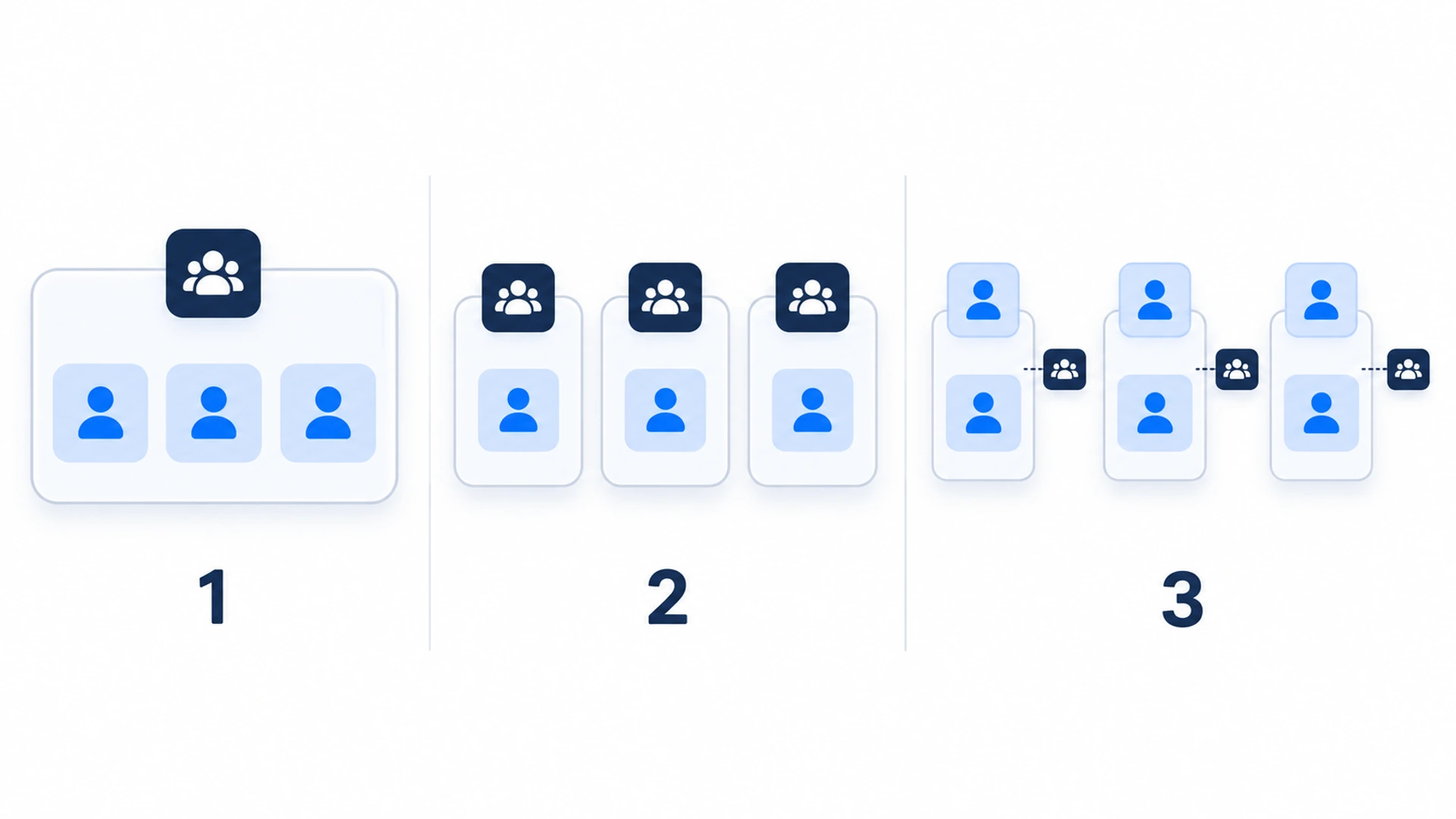
Client-owned is nearly always the cleanest exit. The exception is a client who wants one invoice and no logins: keep an account per client then, never the shared one, and promise in writing to transfer it on request.
The Accounts To Walk Through With The Client
- Domain registrar and DNS. Check whose name and email are on the registration. For .com and other generic domains, ICANN’s Transfer Policy (opens in a new tab) puts a 60-day lock on moving registrar after the registrant’s name, organization or email changes, unless the registrar offered an opt-out first. Ask the registrar before you edit the record.
- Hosting or site builder. Find the owner role and the card on file.
- CMS admin. In WordPress, changing the Administration Email Address sends a confirmation to the new address, and the old one stays active until that link is clicked. Do it with the client’s inbox open.
- Paid licenses and embeds. Themes, plugins, fonts, booking, payments, the cookie banner: who holds each, and when it renews.
- The contact widget and chatbot. Covered next.
Set Up The Contact Widget As A Flidu Workspace The Client Owns
Take the widget in the corner of the site: a WhatsApp button, a contact form, perhaps a chatbot. Its settings decide which phone and which email address a customer reaches, and we build Flidu, so here we can give exact steps.
A number typed into the page code makes every later change a job for you. With Flidu, one pasted script goes on the site once and later changes happen in the dashboard, so the client can swap a number themselves, provided the dashboard is theirs.
Which Workspace The Widget Lives In
A Flidu dashboard is divided into workspaces, each with its own websites, widgets, AI assistants, team, plans and billing, and three roles: Owner, Admin and Viewer. Here are the three models.
- The client’s own workspace. The client signs up (a first workspace is free) and, on a plan with a second seat, invites you from the Team page as an Admin. To leave, choose Leave Workspace.
- A workspace per client that you own. Each workspace after your first needs its own paid plan, on Website Widgets or AI Chatbot. Invite the client as a Viewer, who can look but not change anything, then transfer ownership on the day.
- One agency workspace for every client site. Website Widgets Pro and above allow more than one website per workspace, which suits client sites you’ll keep running yourself. But roles cover the whole workspace, so anyone you invite sees every client, and nothing in the dashboard moves a website to another workspace. Leaving means rebuilding the widget and replacing the script.
For a client who will stay on Free or Starter, that settles it: they sign up themselves in week one and share their screen while you build. Flidu also isn’t white-label. The client sees our name in the dashboard, and “Powered by Flidu” on the widget can only be hidden on Business or above.
How To Transfer Ownership In Flidu
Only the Owner can do this.
- Open Team and press Invite Member. Enter the client’s email address, choose Admin or Viewer and send the invite.
- The client opens the emailed invitation, which lasts 7 days, and accepts while signed in with that same address. Wait until they appear under Active Members.
- Open the menu on their row, choose Transfer Ownership, then Continue.
- Read the warning with the client on the call: the new Owner takes on members, subscriptions, invoices and renewals, and you’re asked to finish any card or renewal changes first. Tick the acknowledgement, type TRANSFER and press Transfer Ownership.
- Verify it’s you with an authenticator app, a passkey or a fresh email code.
- Check the result, which is immediate: the client is the only Owner, and you are an Admin with billing access off.
The card on file isn’t swapped, and with billing access off you can’t change it; that’s now the new Owner’s job, using Update payment method under Billing. And you are still a member, using a seat: stay as an Admin if you maintain the site, or use Leave Workspace on your own row.
Contact Channels And Where Each Enquiry Lands
During a build, every destination points at you. The form writes to your test address, the WhatsApp button opens your phone, the booking link goes to a demo calendar. Miss one and nobody rings to complain, because a form that sends to the wrong inbox looks exactly like a quiet week.
Form Notifications In Flidu
There are two addresses to check. On the widget’s Settings tab, read Notification Email under Site Settings: the default recipient, typed in when the widget was created, and the one Feedback and Guided Form notifications use. Then open each Contact Form on the Channels tab. Each has its own Notification email field, and that address wins.
Channel edits go live only after Save as Draft and then Publish changes, so a corrected address left as a draft still sends to you. On the Settings tab, read Domain as well: it should be the address visitors browse, not the staging one you built on, because Flidu only accepts form submissions sent from that domain.
The Contact Form starts on Website Widgets Starter, and below Website Widgets Business a submission exists only as that email, so one sent to your test address never reaches the client. An Ask AI assistant with Visitor Capture on (AI Chatbot Starter and up) has a Capture notification email of its own, on the assistant’s Settings tab.
Then send a test from the live site, on a phone using mobile data, and have the client find it, spam folder included. Leave a minute between tests. If nothing arrives, work through the delivery test in our piece on quiet contact forms.
Whose Number Is On The WhatsApp Button
Flidu’s WhatsApp channel is on Website Widgets Free, and it is a hand-off: the visitor taps, WhatsApp opens, and the conversation happens on whichever phone owns the number. Flidu stores none of it. A button left on your number sends the client’s leads to your handset.
On the Channels tab, open WhatsApp and read the Phone number field. In Multiple Agents mode, which starts on Website Widgets Starter, each agent has one. Change it to the client’s number with its country code, press Test on WhatsApp to confirm the chat opens there, then save and publish as above. If channels were set up during sign-up, review them on this tab and add WhatsApp from Add Channel.
| Other Flidu Channels | Check Before You Leave | Write Down |
|---|---|---|
| Messenger, Instagram DM, Telegram | Each opens the client’s page, profile or handle | Who reads the messages |
| Book Appointment | The Booking URL opens the client’s calendar | Who owns that account |
| Find Us / Maps and Leave a Review | Both links open the right listing | Its primary owner |
| Business Hours | Each day’s hours and the Note | Who updates them |
Business Hours and Book Appointment start on Website Widgets Starter; the others are on Free. Before you go, switch off any channel nobody at the client has agreed to answer.
Content Editing: Who Changes What After You Leave
The next call is rarely about a fault. It’s “how do I change our opening hours?”, from someone who was shown once, in a meeting, three weeks ago.
Agree the split in writing. A workable rule of thumb: words, photos, prices and hours are the client’s to change; navigation, layout, forms and code are a request to you at a stated rate. Inside the widget, the Owner or an Admin edits hours, FAQ answers and the WhatsApp number in the Flidu dashboard, and a Viewer can’t change any of it.
If the content lives in a Git repository, a GitHub login for the client is rarely the answer. Our sister product Acrosite has written up how a client reviews and signs off content without a GitHub account (opens in a new tab).
Analytics, Search Console And The Business Profile
These often sit in the agency’s Google login.
- Analytics. Google lets you move a property (opens in a new tab) to an account the client owns, from Property details in Admin. Its help page says you need the Administrator and Editor roles on both accounts.
- Search Console. Have the client verify the property themselves, then add you as a user: Google warns that users lose access after a grace period once every verified owner is gone.
- Business profile. Only the primary owner of a Google listing can pass primary ownership on, and a newly added owner or manager waits 7 days (opens in a new tab) before managing every feature. Add the client a week ahead.
- Widget analytics. Flidu’s own numbers stay in the workspace and change hands with it. Its Google Analytics 4 Integration (Website Widgets Pro and up) passes events to the Google tag already on the page. If you typed a Measurement ID into it, check it’s the client’s, or clear it and publish, so events follow the site’s own tag.
Documentation And The Handover Note
One page, because one page gets read and can be found again in a year.
A Printable Website Handover Checklist
Copy this, delete the lines that don’t apply, and fill it in with the client, not for them.
WEBSITE HANDOVER: [client] / [site] / [date]

ACCOUNTS (each one: owner, recovery email, sign-in codes, card, renewal date)
[ ] Domain registrar
[ ] DNS
[ ] Hosting or site builder
[ ] CMS admin and administration email
[ ] Paid themes, plugins, fonts, images
[ ] Booking, payments, cookie banner

CONTACT WIDGET (Flidu workspace)
[ ] Client is Owner; agency is Admin, or has left
[ ] Card under Billing is the client’s
[ ] Domain on the widget’s Settings tab is the live one
[ ] Notification Email on the same tab
[ ] Notification email on every Contact Form
[ ] Capture notification email, if Ask AI is on
[ ] WhatsApp phone number, tested on the client’s phone
[ ] Booking URL, map link, review link
[ ] Messenger, Instagram DM and Telegram handles
[ ] Business Hours and its Note
[ ] Channels nobody answers are switched off
[ ] Every channel edit published, none left as a draft

EDITING
[ ] Named editor at the client, lowest role that works
[ ] Recording of their three most common edits
[ ] One real edit published by the client while you watch
[ ] How to undo a change, and where the backup is

ANALYTICS
[ ] Analytics account and property
[ ] Search Console verified owner
[ ] Tag Manager container
[ ] Business profile primary owner
[ ] Reports and alerts that still email the agency

LAST
[ ] Agency card removed everywhere
[ ] Agency access reduced or removed, with the date
[ ] Who to contact, for what, at what rate
What The Note Says In Sentences
Tick-boxes can’t carry the parts that cause arguments, so write those out underneath: what you still have access to and until when, what counts as a paid request and at what rate, and which renewals fall due in the next twelve months.
If the client has turned down a maintenance plan, say what they’re now responsible for; small recurring add-ons sometimes land better than a retainer. A chatbot needs its own line: who approves its sources, and who reads the questions it couldn’t answer (our costing for agencies prices that work).
Handover Day, In Order
The website handover checklist says what has to move. This is the order we’d move it in.
- A week or more ahead, invite the client to every account, so waiting periods are out of the way.
- On the day, replace your card with theirs. Do it before the transfer wherever the vendor wants billing settled first, as Flidu’s warning does.
- Transfer ownership one account at a time, with the client on the call.
- Where a tool has only one login, move the recovery email and sign-in codes instead.
- Switch every destination in the widget: both notification emails, the WhatsApp number, the booking and review links. Publish each change.
- Load the live site, check that Last detected on the widget’s Install tab is recent, then test each channel from a phone and have the client confirm what arrived.
- Cut your own access to what ongoing work needs, and write the date in the note.
- Book fifteen minutes a month later to look for anything that still points at you.
One last test. If you lost your phone and your inbox tomorrow, could the client still log in, pay, edit and receive enquiries? Any line where the answer is no is still yours.
Frequently Asked Questions
What should a website handover checklist include?
Who should own the domain name after a website is finished?
How do I transfer a Flidu workspace to a client?
Should a web designer keep access after handing over a site?
Where do contact form enquiries go after a website handover?
 AgenciesUpsells For Web Design Clients Who Will Not Buy Maintenance
 AgenciesWhat It Costs To Sell AI Chatbots To Web Design Clients
 Conversion & Visitor ExperienceNobody Fills Out Your Contact Form. Is It Even Working?
 Conversion & Visitor ExperienceTrack Website Enquiries Without A CRM You Will Never Open