What To Do With Unanswered Chatbot Questions Every Month
The questions your assistant could not answer are a to-do list for your website. Here is a monthly routine for sorting them in Flidu and fixing the pages behind them.

Nearly all the feedback a website gets has been softened by the time it reaches you. Surveys are answered by the people kind enough to answer surveys, and analytics show which pages were opened, never what the reader was hoping to find on them.
The list of unanswered chatbot questions is different. Each line is something a real visitor wanted to know, typed in their own words at the moment they wanted it, and your website couldn’t tell them. Nobody was being polite. It’s the most honest feedback your site gets, which is what makes it so easy to open once, wince at and close.
We treat it as a to-do list for the website, not a bug report for the bot. One sitting a month is enough: sort every line into four buckets, and only one of them turns into writing. The steps below are for Flidu, the tool we build. If you have no assistant yet, read how to add an AI chatbot to your website first, or start with the questions your website should answer.
Why A Miss Is Usually A Website Problem
Ask AI, the assistant side of Flidu, answers from sources you approve: your pages, uploaded files, question-and-answer pairs you write. It doesn’t search the open internet to fill a hole; it’s built to say when those sources don’t cover a question. So suspect the page before the software. Either the fact isn’t written anywhere, or it’s written in words the visitor would never use.
There’s a shortcut beside each miss, and we built it ourselves: a link for typing an answer straight into the assistant. It has its uses. But an answer that lives only there never reaches the visitor who skips the widget, or a search engine. Fix the page first. Then everyone reads the same sentence.
One warning: don’t aim for an empty list. An assistant that never says “I don’t know” is either reading a perfect website or guessing. Bet on guessing.
Where Flidu Keeps The List
It’s in the dashboard, in two places.
Finding Unanswered Chatbot Questions In AI Analytics
- In the dashboard sidebar, open AI Chatbots and choose the assistant.
- Open its Analytics tab, which loads the last 30 days.
- Scroll to the Unanswered Questions card, the one with the Content gaps chip. Each row is a question in a visitor’s own words, with how often it was asked.
- For every assistant at once, open Analytics in the sidebar and choose Visitor Intent. Where your plan includes it, the Content gaps card marks each row “Asked 6×” and names its assistant when you run several.
Both cards rank by times asked and show only the top of the list. Identical wording is merged into one row but different wording isn’t, so “sunday moves?” and “can u come sunday” stay apart until you merge them yourself.
A question lands here when it found no relevant source. Don’t mix it up with a second card, under Analytics then AI Chatbot, that has the same title and a Response failures badge: those replies failed, and no page edit will change that.
What Each AI Chatbot Plan Shows
Flidu sells AI Chatbot and Website Widgets as separate lines with separate plans, and this list belongs to the first. AI Chatbot Free shows usage counters only, so there’s nothing to sort. AI Chatbot Starter is where Top Questions and Unanswered Questions appear, with Manual Q&A for up to 10 entries per assistant. That’s enough for this routine. AI Chatbot Pro adds a 90-day range, and from AI Chatbot Business the AI Data Hub stores AI conversations, with CSV export for Owners and Admins.
On every paid plan the product points at the gap and stops. It doesn’t write the page for you. Data Hub and Analytics shows what the reports cover, and pricing has the full plan comparison.
The Monthly Routine For Unanswered Chatbot Questions
Pick a fixed day, say the first Monday, and block an hour (a rule of thumb). Don’t let months pile up: AI Chatbot Starter offers the last 7 or 30 days only. You need a spreadsheet with five columns.
Question (as typed) | Times asked | Bucket | Fix | Date it answered- Copy each Unanswered Questions row into the sheet with its count, exactly as shown. Typos stay; names and phone numbers don’t.
- Merge near-repeats into one row and add up their counts.
- Give every row one of the four buckets below.
- Write the four bucket totals at the top, with the month.
- Sort the missing-content rows by times asked and take up to five from the top.
- Make those fixes: an edit to the website, or a correction or Manual Q&A where that fits better.
- Press Recrawl once, after the last page edit is published.
- Ask each original question in the assistant’s Preview tab and note the date it answered.
Step five is the discipline: about five page edits a month is what fits (another rule of thumb), and skipped rows come back if they matter.
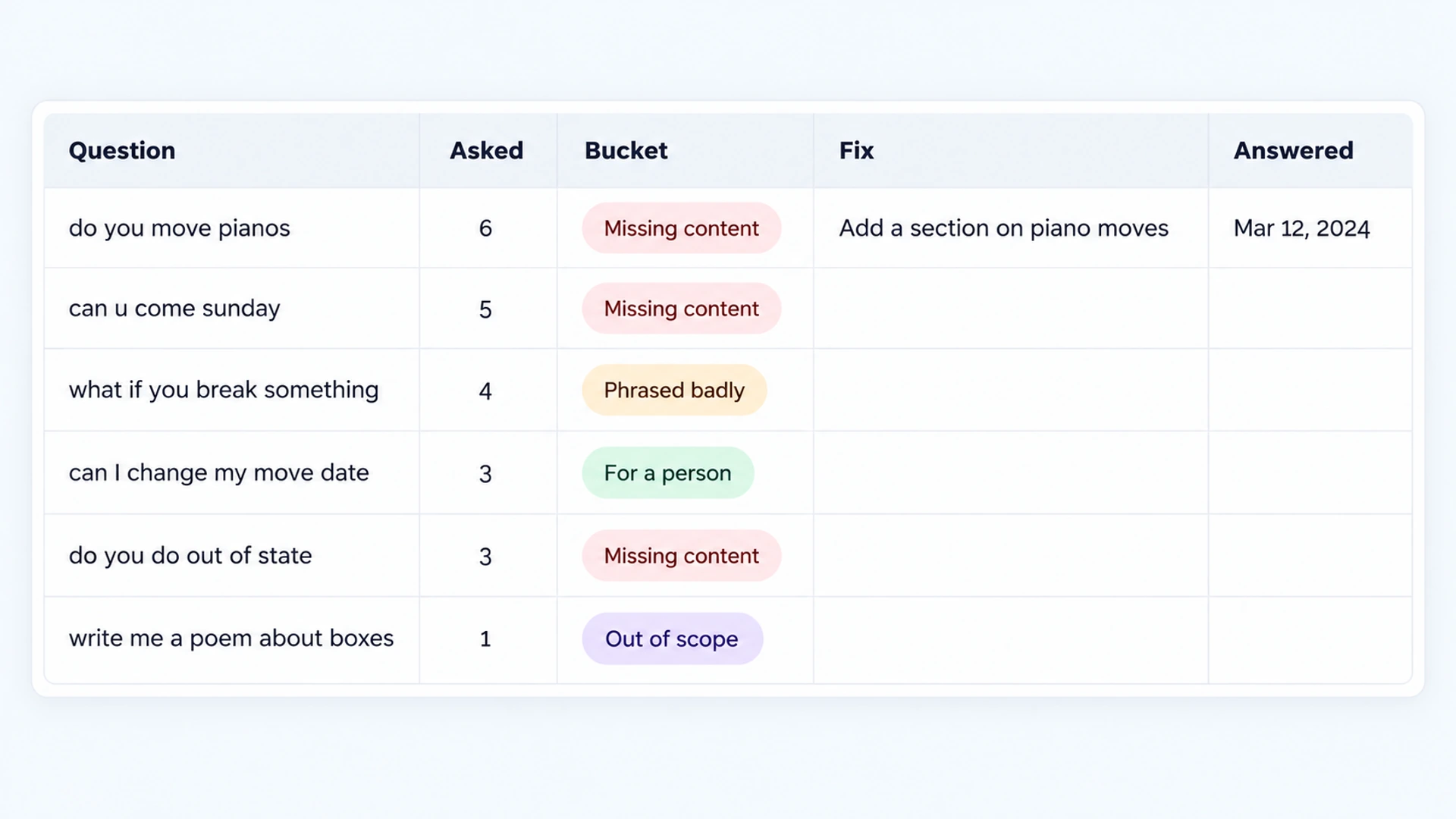
The Four Triage Buckets
Say you run a two-truck moving company and this month’s card shows ten rows. Each gets one label.
| Bucket | The Test | What To Do In Flidu |
|---|---|---|
| Out of scope | No visitor would expect your site to know. | Nothing. Watch the total. |
| Missing content | A fair question no page answers. | Write it on the site, then Recrawl. |
| Phrased badly | Ask AI answers it in your words. | Add their wording to the page. |
| For a person | Only your team can settle it. | Check the Fallback tab. |
Out Of Scope
“Write me a poem about boxes.” “asdf.” A question about some other company’s invoice. Count them and move on. If they ever outnumber the rest, visitors may not know what the assistant is for: open its Suggested Questions tab and set a few prompts live that your pages can answer.
Missing Content
A fair question, and the site doesn’t say. “Do you move pianos?” “Do you do out-of-state moves?” The true answer to the second may be no, and it still belongs here, because a visitor who can’t find a no has to ask, wait and hear it later.
Phrased Badly
The answer exists, but in your vocabulary. A visitor asks “what if you break something” and gets no real answer, while your services page says “all moves include transit protection”. To test a row, ask it in your own words on the assistant’s Preview tab: if it answers you and not them, the wording is the gap.
Fixing it takes one sentence on the page, their phrase next to yours: “If something is damaged during the move, our transit protection covers it.”
Should Go To A Person
“Can I change my move date?” “The truck was two hours late, who do I talk to?” “How much to move a ten-foot aquarium?” Ask AI was right to hold back. Each needs a booking lookup, an apology or a judgment call.
So the fix is to the hand-off, which in Flidu is the Contact tab that sits beside Ask AI when both share a widget. Open the assistant’s Fallback tab. “Visitors can switch to Contact” means a stuck visitor can reach your contact channels. “Ask AI-only placement” means there’s no Contact tab to switch to, and where the tab offers an Add Website Widget link, it takes you to connect one.
Those channels follow your Website Widgets plan, not the AI Chatbot one: WhatsApp, Telegram, Messenger and Instagram DM are on Website Widgets Free, and a Contact Form starts on Website Widgets Starter (Contact and Ask AI in one widget explains the pairing). From AI Chatbot Starter, Contact Intent Capture, a switch in the assistant’s Settings, can offer a short form when a visitor’s message asks to talk to someone, and email you their details.
It’s a hand-off, not live chat: nobody joins the conversation, what the visitor typed doesn’t follow them into WhatsApp or a form, and you reply later. There’s no field for a fallback message of your own either, so our chatbot fallback message examples cover the wording you do control.
Turning The Missing Content Pile Into Pages
Every missing-content row becomes one of four things on your website. Pick the smallest that does the job.
- One clearer sentence. The fact is on the site but buried, or it sits only in a header, footer, image or PDF, which you can’t count on the assistant reading (see how to prepare website content for an AI chatbot). State it plainly in the body of the page, where the doubt comes up.
- An FAQ entry. A short, stable answer that fits no service page, like which box sizes you sell.
- A new page. Several questions circling one topic. Three rows about storage are asking for a storage page.
- The plain “we do not offer that”. Said where the visitor would look, with what you do offer beside it.
Owners resist that last one. But “We don’t do out-of-state moves. Inside the state, we go anywhere” answers the question in seconds, and Ask AI can then say no where it used to come up empty.
Use The Visitor’s Wording As The Heading
Whatever you write, title it the way it was asked. Suppose the card shows “can u come sunday”, “do you work weekends” and “sunday moves?”. The heading becomes Do You Move On Sundays? and the answer is the first sentence under it. Their words, your spelling.
[The question, as visitors ask it]?
[Yes or no in the first three words.] [The one condition that matters.]
[What to do next, or what you offer instead.]
A skimming visitor spots their own question in a heading like that, and an assistant tends to match a question more easily when the page uses its wording. It’s also how people search: Google’s SEO Starter Guide (opens in a new tab) tells site owners to think about the words a user might search for.
When A Manual Q&A Is The Right Fix
Sometimes the page can’t change this week, because the site is a client’s or the developer is booked. Other times the answer is one short rule (a deposit, a cancellation window) that you want the assistant to have in your wording. Flidu has two places to store a question-and-answer pair as a source Ask AI can answer from.
For a single miss, use the Add correction link beside its row on the Unanswered Questions card. It opens the assistant’s Settings with the visitor’s question filled in; type the preferred answer, press Save correction, and it’s indexed with no recrawl. For a planned batch, use Manual Q&A: open Data Sources, press Add Source, choose Manual Q&A, enter each pair and save the source. It’s saved as a draft: press Start indexing on its card and wait for Indexed.
Corrections and Manual Q&A both need AI Chatbot Starter or higher, and each has its own cap by plan, so spend them on questions that keep coming back. Ask AI still writes the reply itself, so read the result in Preview. Neither is a reply to the person who asked. That visitor has gone. The answer is for the next one.
Get Flidu To Read The Fix, Then Ask Again
A page fix the assistant hasn’t read isn’t a fix yet. Flidu re-reads a website source only when you ask it to: on the Data Sources tab, find the source’s card and press Recrawl.
New pages need one more check. A Website URL or Sitemap source reads a limited batch of pages per crawl, and Follow links on this site goes only one level deep, so a new page can be missed. A Manual URL List source indexes exactly the pages you list, so add the new page there.
Then open Preview and ask the original question, typos included. Preview questions count toward your monthly AI messages, so re-test only the rows you fixed.
Three things can happen. It answers correctly, and you write the date in the last column. It still can’t answer, which usually means the page wasn’t picked up: look under Indexed Content on the Data Sources tab, where each page carries a state such as Indexed, Ignored, Skipped or Could not read. Or it answers wrongly, and you stop to work through what to do when a chatbot gives wrong answers.
Next month, put the four totals beside this month’s. The missing-content number should fall, though we can’t tell you how fast. Don’t expect the out-of-scope or person totals to move much. They were never yours to shrink.
When The List Is Very Short Or Very Long
An empty card isn’t always good news. Check the Messages and Sessions counts on the same tab first. If almost nobody is asking, there’s nothing to miss, and the better question is whether an AI chatbot is worth it for a small business.
A busy assistant has the opposite problem. The card stops after the most-asked rows, so a monthly view can hide a long tail of unanswered chatbot questions asked once each. Look weekly on the 7-day range for a month to see what the ranking pushed off the bottom.
Keep every month’s tab; marketing teams can use the sheet as a content brief. A question that comes back after you marked it fixed is telling you the sentence didn’t land. Rewrite it.