Chatbot Versus FAQ Page: Write The FAQ First
A chatbot answers from what your pages say, so the FAQ page comes first. Then put it to work in Flidu: Ask AI answers from it, and the FAQ channel keeps the top five inside the widget.

The FAQ page is not obsolete. It is the page your chatbot reads.
A website chatbot of the kind sold to small businesses knows nothing about yours until it has gone through your pages. The page where your answers are already written out, one question at a time, is the best material you can give it.
So the usual chatbot versus FAQ page argument has the relationship backwards: one is the source and the other is a way of searching it. We build one of these assistants, and our advice is still to write the FAQ first, then put it to work. Here are both halves: the page itself, and the Flidu setup that serves its answers anywhere on your site.
Chatbot Versus FAQ Page: What Each One Is Good At
An FAQ page costs nothing to run, and you can check every word before a customer reads it. A website chatbot is closer to a search box that replies in sentences: the visitor asks in their words, from any page, and the reply is assembled from what your pages say.
| The Job | FAQ Page | Chatbot |
|---|---|---|
| A question you did not predict | No | Only if some page covers it |
| The visitor's own wording | Only if they spot the right heading | Yes |
| Found through a search engine | Yes | No |
| Shows you what people ask | No | Yes, on a plan that reports it |
A chatbot does not know more than your website does. Ask it something no page covers and a careful one says it doesn't know, while a careless one guesses. (Flidu's Ask AI is built to be the careful kind, instructed to answer from sources you approve.) Either way the cure is to write the answer down, and that's an FAQ entry.
When An FAQ Page Alone Is Enough
More often than people who sell chatbots like to say, and we're among them. A page on its own will do the job if most of these are true:
- Your repeat questions make a short list (fifteen or fewer is our rule of thumb) and the answers are stable: hours, delivery area, how booking works.
- Customers ask in roughly the words you'd use yourself.
- Most enquiries arrive while someone is around to reply.
If that describes your site, the chatbot versus FAQ page decision is made for now: write the page and leave the assistant for later. Our piece on whether an AI chatbot is worth it has a self-check with numbers.
One weakness remains even then: the answer sits on /faq while your visitor is on the booking page. Closing that gap takes no AI, only a short FAQ list inside the widget: step three below. For a site like yours, steps one and three are the whole job.
A Ten-Minute Test To Settle Chatbot Versus FAQ Page
Open the page on your phone and hand it to a friend. Read out three real customer questions in the customers' own wording and time each answer. Under about twenty seconds apiece (a rule of thumb) and the page is working.
Watch for two failures. Your friend scrolls past the answer because the heading uses your word and not theirs, or the answer turns out to live on another page. An assistant copes with both, and with sheer length: nobody scrolls thirty entries. Fail on any of those and you want steps two and four as well.
The Order Of Work: Page First, Then The Widget
Flidu is one widget in the corner of your site with two sides: Ask AI, an assistant that answers from pages you approve, and Contact, a set of channels, one of which is an FAQ list. They're separate product lines with separate plans, AI Chatbot and Website Widgets. Each has a Free plan.
Four steps, in this order: write the page, give it to Ask AI, put the five questions everybody asks in the FAQ channel, then read what went unanswered each month. The first two fit on Free plans. The last two each need a Starter plan, flagged where it applies.
Reverse the order and you get an assistant that can't answer the questions everybody asks. It takes the blame, and the missing page gets away with it.
Step One: Write FAQ Answers An Assistant Can Lift
No software writes this page for you, ours included. It has three readers now: a person skimming on a phone, Ask AI, which cuts the page into passages and answers from the ones that match, and an outside answer engine such as Google's AI results. Each lifts one answer out and reads it alone, so every entry has to make sense with nothing around it (Microsoft gives the same advice for AI search (opens in a new tab)).
Start from real questions: two weeks of email, call notes and messages, in the customer's wording. (Our guide to the questions your website should answer has the full method.) Then four rules.
- Answer in the first sentence, then give the reason and the exception.
- Name the thing. Write "A wedding order needs eight weeks' notice", not "It needs eight weeks' notice". A lifted passage may not bring its heading along.
- Keep each answer self-contained. "Same as above, but for weekends" is useless to an assistant and to anyone arriving from a search result.
- Ask the question the way customers ask it. "Fees" isn't a question. "How much does delivery cost?" is.
Here is a florist's delivery entry.
Before
Q: Delivery?
A: Thanks for asking! We offer a range of delivery options to suit you. Get in touch to find out more.

After
Q: Do you deliver on Sundays?
A: Yes. We deliver on Sundays to addresses within 5 miles of the shop. Order by 2pm on Saturday. Outside that area, Sunday delivery is not available.
The second stands on its own, so Ask AI has a whole answer to write its reply from.
What Search And Answer Engines Still Want
FAQPage markup once earned expandable questions under your Google result. Google limited that to government and health sites in 2023 and, according to its documentation changelog (opens in a new tab), stopped showing it altogether on May 7, 2026. Don't pay anyone for it.
There's no trick for AI answers either: Google's guidance on AI features (opens in a new tab) says no special schema or AI file is needed. What's left is one real web page at an address like /faq, linked from the footer, each question a heading with its answer in plain text.
Step Two: Give The Page To Flidu Ask AI
Ask AI sits in the corner of every page the widget is on, and a visitor can type "do u deliver sundays" without knowing your FAQ exists. AI Chatbot Free is enough to start: one assistant, one website, sitemap or URL-list source, 50 indexed pages and 100 AI messages a month (the pricing page lists the rest).
If you have no Flidu widget yet, create one first (Website Widgets in the sidebar, then start a new widget). Publish one contact channel on it, such as WhatsApp, so a stuck visitor has somewhere to go: channels stay drafts until you publish them. WhatsApp is on Website Widgets Free, and step three uses the same widget.
- In the Flidu dashboard, open AI Chatbots and choose Create AI Chatbot. The flow has five steps: Basics, Data Sources, Behavior, Fallback, and Preview & Connect.
- At Data Sources, click Add Source, pick Manual URL List and paste the FAQ address plus the pages it leans on (pricing, delivery, booking), one per line, up to 25. That way only pages you chose get read. Website URL and Sitemap sources read a limited batch of pages per crawl, and AI Chatbot Free allows one web source per assistant.
- Save the source and choose Start indexing. Continue through Behavior and Fallback, which turn read-only once indexing begins: the defaults will do, and the same settings stay editable on the assistant's Settings tab.
- On the last screen, choose Add to an existing Website Widget, pick yours, confirm with Connect Now, then choose Create AI Chatbot. Ask AI joins the widget as a draft, private until you publish it. If that option is closed, indexing hasn't finished or the widget isn't published: choose Save as draft and use Connect to Widget on the assistant's Preview tab later.
- Once the checks below pass, choose Publish Ask AI on the Preview tab, and Contact and Ask AI become two tabs in one widget. If the widget isn't on your site yet, copy the snippet from its Install tab and paste it once, just before the closing body tag. The install guide covers hosted builders such as WordPress and Squarespace.
Our guide on how to add an AI chatbot to your website takes each of those steps more slowly.
Check What It Read Before Visitors Do
Open the assistant's Data Sources tab and scroll to Indexed Content. Your FAQ page should be listed as Indexed. If it says Could not read, check the page is public and not behind a login.
Next, go to the Preview tab, a test chat only you can see. Ask a few questions the way a customer would, misspellings included, and look under each reply for the Source Card naming your FAQ page, where one is shown. Keep it to a few, because test questions come out of your monthly AI messages.
If the page folds its answers into an accordion, ask about one that sits in a closed section. Ask AI reads the text a page arrives with: it runs no scripts and clicks nothing, so an answer fetched on click never reaches it.
Last, open the Suggested Questions tab and add the top entries from your FAQ, set live. Visitors see them as tappable prompts on opening Ask AI. AI Chatbot Free shows up to three.
Step Three: Put The Top Five In The Flidu FAQ Channel
Some questions get asked so often that making people type them is a waste. Flidu's FAQ channel is a short list of questions and answers inside the widget, on the Contact side, which a visitor opens from any page. No AI is involved: people see exactly the words you typed. It starts on Website Widgets Starter. On Website Widgets Free you can set it up as a draft, but visitors won't see it.
- Open Website Widgets in the dashboard and pick your widget.
- On the Channels tab, click Add Channel. FAQ is in the Content group.
- Click Add Question and paste the question and answer exactly as they read on your FAQ page.
- Repeat for the five or so asked most, in the order you want them shown.
- Choose Save as Draft, then Publish changes. Nothing shows on your site until you publish, so afterwards open the widget on your live site and read each answer.
We'd keep it to a handful. Thirty questions in a widget is the long page again in a smaller window. The long tail belongs to Ask AI, the other tab in the same widget.
Three Copies, One Master: Keeping Them In Step
After steps two and three your answers live in three places: the page, Ask AI's indexed copy of the page, and the FAQ channel. Flidu does not sync them. Ask AI doesn't read the FAQ channel, and it won't write or import entries for it. So the page is the master copy and the other two follow it.
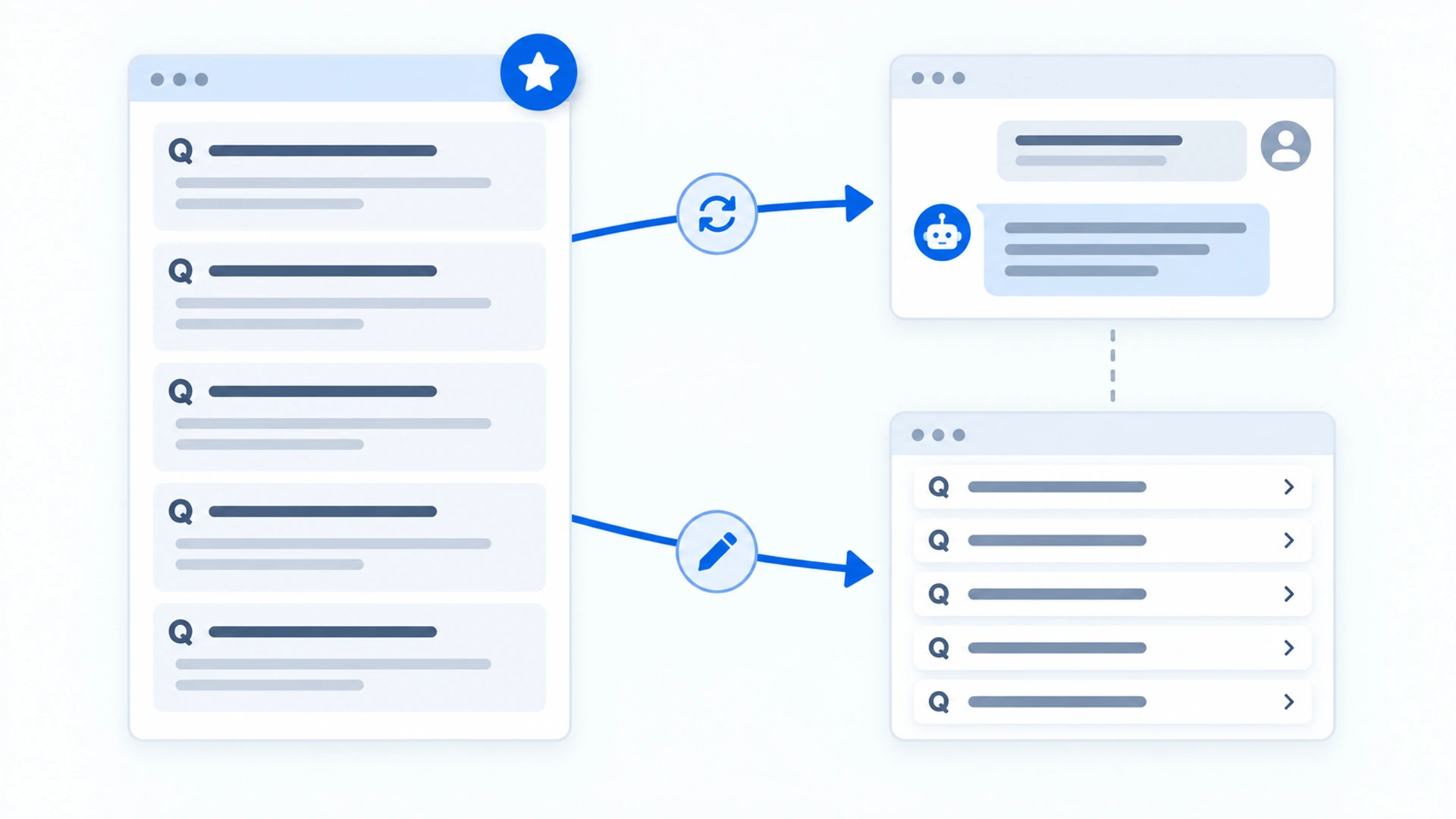
When a fact changes, do four things the same day:
- Edit the FAQ page.
- On the assistant's Data Sources tab, press Recrawl on the source.
- Ask the question in Preview and check the new answer comes back.
- Change the same entry in the FAQ channel and publish it.
And the limits:
- Recrawls are rationed. Editing the page doesn't refresh the indexed copy; Recrawl does. After one, the source shows when the next is available, and each AI Chatbot plan has a monthly recrawl allowance, counted on the assistant's Usage tab. Batch your edits.
- Search gets nothing from the FAQ channel. It lives inside the widget, not in the text of your page, so it can't stand in for the FAQ page.
- There is no fallback message to write. When your sources don't cover a question, Ask AI is built to say so in its own words. In a widget that also has Contact channels the visitor can switch to the Contact tab, and whoever does still needs a reply from you.
Step Four: Let Ask AI Show You What The FAQ Is Missing
A page can't tell you which questions it failed to answer. The visitor just leaves. Ask AI keeps a record: from AI Chatbot Starter, the assistant's Analytics tab lists Top Questions and Unanswered Questions, while AI Chatbot Free shows usage counters only.
Once a month, go through Unanswered Questions. Each line is one of these:
- A real gap. Write the entry on the page, then recrawl.
- Already answered, under a heading no customer would think of. Reword the question on the page.
- Not an assistant's job, such as a quote or a complaint. Leave it out, and check the Contact tab gives that person somewhere to go.
Our monthly routine for unanswered chatbot questions goes through it step by step. And if a month's list comes back nearly empty, that tells you something as well: the page is probably doing the job.